Build the request. Load test it. Let your agent drive.
Vayu is a free, open source API client for REST and GraphQL with a native C++ load tester built in - and an MCP server that hands the whole engine to Claude Code, Cursor, VS Code, or Codex. One app instead of three, all of it on your machine: no account, no cloud sync, no telemetry.
Download Vayu Use it from your agent See what it does
Coming from another tool? Read the honest comparison: Postman · Bruno · k6 · JMeter
Install
Windows (x64), macOS 13.3+ (universal), and Linux (AppImage). No account, no sign-in.
macOS 13.3 (Ventura) or later. Electron sets a macOS 13 floor for the
app, and the engine raises it to 13.3: libc++ only ships floating-point
std::to_chars from that release, and the engine cannot be built without
it. On anything older the installed app will not launch.
Installs the latest release to /Applications, and asks for your password
once. Vayu ships unsigned, so the script ad-hoc signs the app and clears the
quarantine flag - without that, macOS reports it as damaged.
Updating is the same command. It keeps your collections and settings,
offers to quit Vayu if it is running (and reopens it after), and does
nothing if you already have the latest version - --force reinstalls
anyway.
Pin a version with VAYU_VERSION=0.2.1 in front of the command, or
uninstall by re-running it with -- --uninstall.
Installs the latest release with winget.
Or download the installer directly:
- Download Vayu-x64.exe.
- Run the installer and follow the wizard.
- Launch Vayu from the Start menu.
The same command as macOS. It installs the AppImage under
~/.local/share/vayu and registers a launcher entry, so Vayu shows up in
your applications menu. Nothing it writes leaves your home directory, so it
never asks for root. Re-run it to update. x86_64 only.
Or take the AppImage from the latest release and run it yourself - it is self-contained either way.
If it does not start, your system is probably missing FUSE 2:
sudo apt install libfuse2, or run it once with
APPIMAGE_EXTRACT_AND_RUN=1.
All releases Build from source instead
What you can do
Build and test
-
Send REST and GraphQL requests
Every method, and JSON, XML, JSON-RPC, form-data, URL-encoded, raw, or GraphQL bodies. Collections nest, with their own variables, auth, and scripts.
-
Bring what you already have
Drop in a Postman, Insomnia, OpenAPI or Swagger export and keep your folders, variables, auth and scripts. What carries over.
-
Keep your Postman tests
A QuickJS runtime implements
pm.test(),pm.expect(),pm.environment.set()andpm.response.*, so most scripts run unmodified. -
Auth that inherits
Bearer, Basic, API key, and OAuth 2.0 (client credentials, password, authorization code + PKCE) - resolved engine-side, inherited down the tree.
-
Watch a stream as it arrives
text/event-streamis a first-class request type: events land in a live Events view, you can stop the stream, scripts assert on it afterwards, and the list comes back when you reopen the run. -
Find anything, by what is inside it
One shortcut opens a command palette over every collection, request, environment and setting - searching their contents, not just their names.
Under load, and beyond
-
Load test without a second tool
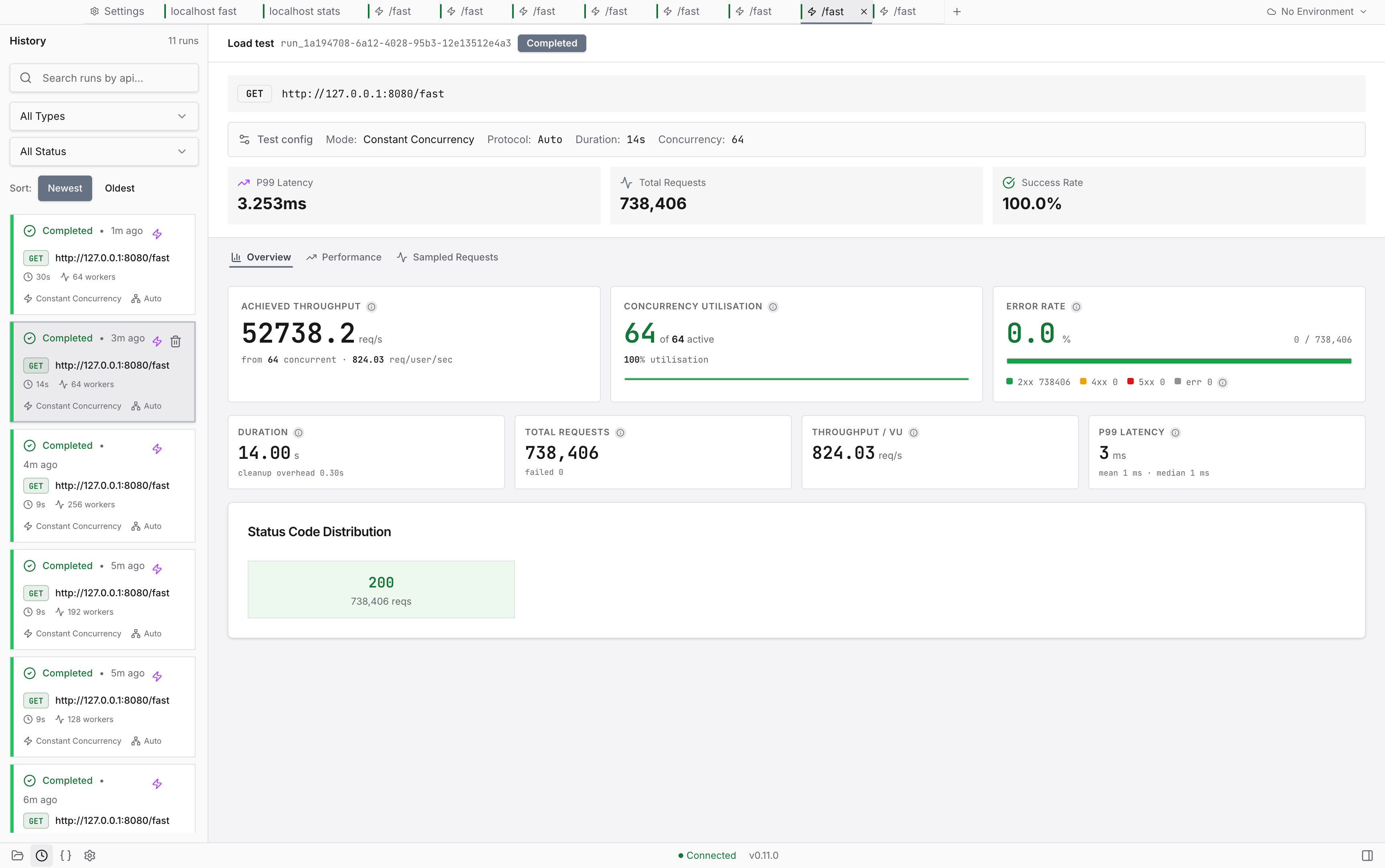
A multi-worker C++ event loop drives the load and streams throughput, latency percentiles, and error counts live. See the benchmarks against wrk and vegeta.
-
Drive a run from a data file
Point a collection at a CSV, TSV, JSON or JSONL file and each iteration gets its own row, as
{{data.column}}tokens andpm.iterationData. Data-driven runs. -
Mock what is not built yet
Serve a collection's saved examples as a live mock, with a mock OAuth issuer for auth flows and a webhook inbox that captures what a third party sends you.
-
Hand it to your coding agent
A built-in MCP server exposes the engine to Claude Code, Cursor, VS Code, Codex and Zed - behind a host allowlist and load caps you set. Drive Vayu from your agent.
-
Private by default
100% offline execution. No telemetry, no account, no cloud sync - your requests and secrets never leave the machine.
Bring your existing collections
Switching tools is only cheap if your work comes with you. Drop in an export - the format is detected for you, no "which importer?" dialog - and Vayu rebuilds the tree, variables, auth and scripts.
v2.1 and v2.0 exports. The folder tree, collection and folder variables, auth (Bearer, Basic, API key, OAuth 2.0), pre-request and test scripts, query parameters including disabled ones and their descriptions, and raw, JSON, URL-encoded, form-data and GraphQL bodies.
Environments come across too. Postman exports those as separate files - drop one in and it imports as a Vayu environment, keys, values, enabled state and secret flag intact. A globals export imports the same way, merging into Vayu's globals scope rather than creating an environment; variables you already had are kept, and a name that clashes is overwritten.
Binary and file bodies, a custom HTTP verb, and an auth scheme Vayu cannot execute (hawk, oauth1, edgegrid) are dropped and reported with a count rather than silently, and Digest / AWS / NTLM auth imports as data but will not execute.
Export v4. Vayu rebuilds the workspace, folder and request tree from Insomnia's flat resource list, and workspace environments do come across.
{{var}} templates are converted to Vayu's own. Nunjucks tags ({% ... %})
and filtered expressions ({{ x | filter }}) are left verbatim as text, since
Vayu has no equivalent - they stay visible instead of silently breaking.
OpenAPI 3.1/3.0 and Swagger 2.0, JSON or YAML. A spec describes endpoints
rather than recording requests, so Vayu generates stubs: one collection
per tag, a {{baseUrl}} variable from the server definition, parameters with
empty values, and a request body sampled from the schema. Auth schemes map
across, seeded with {{variables}} for you to fill in.
How import works, format by format
How it fits together
Vayu is a sidecar: the Electron + React UI talks to a C++23 daemon over HTTP
on 127.0.0.1:9876. That split is why the interface stays responsive while the
engine saturates a target - and why the engine can be driven on its own, from the
command line or by a coding agent over
MCP.
Drive Vayu from your coding agent
Vayu ships an MCP server, so an agent can use the same engine the UI does -
send a request, start a load run, read the report, compare two runs. It runs
inside the app on 127.0.0.1:9877, proxying the engine's REST API; there is no
second process to manage, and nothing leaves the machine.
Or click Connect in Settings → MCP, which shells out to the CLI for you.
69 tools, 5 resources, 4 prompts. Inspection (list_collections,
get_run_report, compare_runs), execution (run_request,
run_collection_smoke), load (start_load_run, stop_run), and writes
(full CRUD over collections, saved requests and environments, plus globals and
the cookie jar) - each with a typed schema, so the agent gets validation rather
than guesswork.
An agent pointed at your engine is a real capability, so it is gated. Tools that touch the network refuse any host outside an allowlist that starts empty (deny all). Load runs are additionally capped on RPS, concurrency and duration, and require confirmation. The tools that mutate saved data sit behind a write toggle that is off by default. All of it lives in Settings → MCP and persists.
Reference
Engine - the C++23 daemon: execution, load generation, persistence, scripting.
| Document | Covers |
|---|---|
| Overview | Core structure, thread pool, engine-side auth resolution |
| HTTP API | Every endpoint, payload shape, and status code |
| Test Scripting | The QuickJS sandbox, script globals, hooks, limits |
| Local Database | SQLite tables and the JSON shapes stored in them |
| Command Line | Flags and subcommands for running the engine standalone |
| MCP Server | The tool surface exposed to coding agents |
| Benchmarks | RPS head-to-head against wrk and vegeta, with methodology |
Desktop app - the Electron + React renderer.
| Document | Covers |
|---|---|
| Overview | Renderer-side structural decisions |
| UI Components | The modules/ + components/ layout |
| Design System | Tokens, elevation, typography, component patterns |
| State Management | Zustand stores, TanStack Query keys, cache policy |
| Talking to the Engine | What the renderer sends the engine, and when |
| Variables | How {{variables}} resolve, and scope precedence |
| Postman Script Support | Which pm.* APIs the runtime supports |
| File Naming | Naming rules across the renderer |
| Importing Collections | The import pipeline, plus per-format mapping |
Design notes - rationale that is easy to misread from the code alone: Request Storage, Lock Files.
Questions people ask
Is Vayu free?
Yes - fully free and open source, with no paid tier, no subscription, and no feature gating. The engine is AGPL-3.0 and the app is Apache-2.0.
How is it different from Postman, Bruno, or Insomnia?
Those are good API clients, but none of them load test - for that you reach for k6 or JMeter as a second tool. Vayu does both in one app: build the request, then load test that same endpoint with a native C++ engine. Side by side, with what each one does better: vs Postman, vs Bruno, vs k6, vs JMeter.
Does Vayu support SSE / streaming endpoints?
Yes - server-sent events are a first-class request type. Turn on Event
stream and text/event-stream responses arrive in a live Events tab as they
stream, with a Stop control, scripts that assert on the buffered events once
it closes, and the event list restored when you reopen the run from history.
Streams stay bounded under load rather than buffering without limit.
Can I import my Postman collections?
Yes - v2.0 and v2.1 exports, including folders, collection variables, auth, and pre/post-request scripts. Postman environments are a separate export; import that file too and it becomes a Vayu environment, and a globals export merges into Vayu's globals scope. Insomnia v4, OpenAPI 3.1/3.0 and Swagger 2.0 import too; see what carries over.
Will my Postman test scripts still run?
Most run unmodified. A QuickJS runtime implements the pm.* API -
pm.test(), pm.expect(), pm.environment.get/set(), pm.response.* -
and Postman Script Support lists exactly
what is covered.
Can my coding agent use it?
Yes - Vayu hosts an MCP server on 127.0.0.1:9877 and one command registers
it with Claude Code, Cursor, VS Code, Codex or Zed. The agent gets 69 tools
across inspection, execution, load runs and writes, behind a host allowlist,
load caps, and a write toggle that ships off - and while it is off the write
tools are not listed at all. See the
MCP reference.
Does it work offline, and does it need an account?
Offline, and no account. All execution is local; Vayu contacts no external server during normal use - no telemetry, no license check, no cloud sync.
How fast is the load testing, really?
On a laptop against a loopback target, the engine matches wrk (56,880 vs 54,280 req/s measured in the same session) and edges past vegeta, with all three converging on the same ~57k system throughput ceiling. Driven from the app's own UI, a 60-second run sustained 51,922 req/s and 3.1 M requests with zero errors. Full method, concurrency sweep, and a one-command reproduction are in the benchmarks.
Which platforms are supported?
Windows (x64), macOS 13.3 (Ventura) or later (Apple Silicon and Intel, universal), and Linux (x86_64 AppImage).
Contribute
Bug reports, feature ideas, docs, and code are all welcome. The Contributing Guide covers dev setup, code style, testing, and the release process; Build from Source gets the engine and app compiling locally.
Licensing
The engine is AGPL-3.0 and the app is Apache-2.0. See LICENSE for both texts, and the Security Policy for the threat model and how to report an issue.